
- Published on
Building My Own Software Engineering Team with CrewAI
- Authors
- Name
- Ryan Griego
A practical guide to creating a fully autonomous, locally-run multi-agent engineering team that builds custom Python+Gradio applications using open-source AI models.
🛠️ Try the Engineering Team Generator
Spin up your own application-engineering team, powered by local AI
Get the Code →The Challenge
Software development often demands an entire team: designers, backend engineers, frontend builders, and testers. What if you could automate that flow—using local, private LLMs—to produce production-ready Python apps with zero cloud costs and complete sandboxing?
The goal: deliver an open-source, privacy-respecting system that orchestrates AI "team members" collaborating to take requirements, design backend APIs, generate a Gradio UI, and write tests, all powered by your own hardware.
Why Local and Multi-Agent?
- Cost & Privacy: Run open models (like Llama 3) fully offline with Ollama—no API keys, no data sharing.
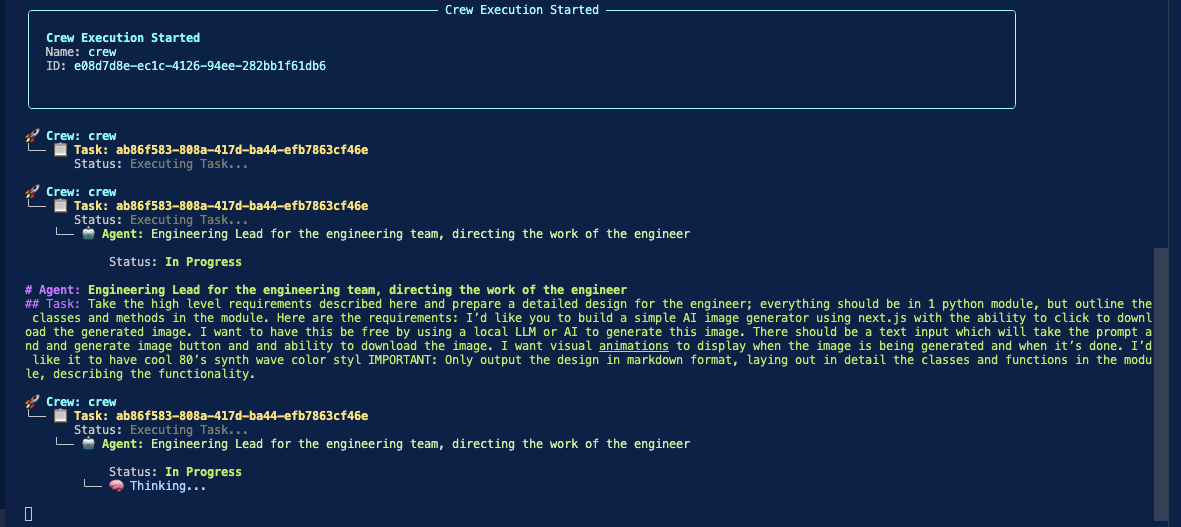
- Real Team Dynamics: Use CrewAI to simulate a real-life SDLC: each agent has a role, voice, and outputs files a human could.
- Code Safety: All code execution (for both dev and tests) is sandboxed with Docker, separating AI from your workstation and data.
The Solution
1. CrewAI Multi-Agent Coordination
Instead of a single monolithic LLM prompt, we leverage CrewAI to define agents (lead, backend, frontend, QA). Each agent has custom YAML config for its goals and outputs.
2. Local LLMs via Ollama
Agents use Ollama as their LLM gateway, running models like llama3.2:latest or llama3.1:8b on your machine. Switch models at any time in YAML: pay nothing and keep your code/data private.
3. Interactive Requirement Selection
A new, user-friendly selector lets you pick (or write) your app spec at launch. Output folders are auto-named—easy to organize and run multiple apps side-by-side.
4. Dynamic Output Generation
Each agent writes its deliverable into a dynamic output folder: design doc, backend module, UI (app.py), and tests. All code is ready to run or edit immediately.
5. Dockerized Code Execution
The backend and test agents can execute code in a Docker container for complete safety, ensuring untrusted code never touches your real machine.
Key Features
- Multi-Agent Orchestration: division of roles, clear system boundaries, explicit task handoffs.
- YAML/ENV Based Config: All agents, tasks, and environment (LLM, Docker, etc) are user-tunable.
- Locally-Sourced AI: Use modern open-source models without the cloud or usage quotas.
- Instant UI Prototypes: Gradio UIs are generated on the fly and launch-ready.
- Safe By Default: Docker execution makes AI-powered codegen safe for rapid experimentation.
Real-World Experience: Model Performance & Challenges
During development, I extensively tested this system across multiple model configurations to understand the tradeoffs between local and cloud-based LLMs.
Model Testing & Comparison
I experimented with both local Ollama models and OpenAI's GPT models:
- Local models:
llama3.2:latestandllama3.1:8b - Cloud models:
gpt-4o-miniandgpt-4o
While the appeal of local models is undeniable—zero cost, complete privacy, and no rate limits—the reality proved more complex in practice.
The Code Interpreter Challenge
The most significant issue I encountered was with tool calling, specifically the Code Interpreter tool that validates generated Python code within the Docker sandbox. This tool is critical for ensuring the AI-generated code actually works before committing it to the output folder.
The problem: Across my testing sessions, the Code Interpreter experienced 24 failed execution attempts when using local Llama models. These failures stemmed from various issues:
- Syntax errors in generated code that the local models didn't catch
- Dependency misconfiguration (missing imports, incorrect package versions)
- Docker connection issues triggered by malformed execution commands
- Edge cases in code generation that produced valid-looking but non-functional Python
Quality Differences: Local vs Cloud
After extensive testing, I consistently found that GPT-4o and GPT-4o-mini produced significantly higher-quality output projects. The differences were notable across multiple dimensions:
Code Quality:
- GPT models generated cleaner, more idiomatic Python
- Better adherence to the specified architecture patterns
- Fewer syntax errors and runtime exceptions
Tool Calling Reliability:
- GPT models successfully used the Code Interpreter tool with minimal failures
- More accurate Docker command generation
- Better understanding of when to validate code vs when to proceed
Project Completeness:
- GPT-generated projects required fewer manual fixes
- More comprehensive test coverage
- Better integration between backend, frontend, and test modules
The Tradeoff Decision
This experience highlighted a fundamental tradeoff in AI-powered development tools:
Local Models (Llama):
- ✅ Zero cost, complete privacy
- ✅ No rate limits or API dependencies
- ✅ Fast iteration for simple tasks
- ❌ Higher failure rates on complex tool usage
- ❌ More manual intervention required
Cloud Models (GPT-4o/4o-mini):
- ✅ Superior code quality and reliability
- ✅ Successful tool calling and validation
- ✅ More production-ready outputs
- ❌ API costs (though 4o-mini is very affordable)
- ❌ Requires internet connection and API keys
For rapid prototyping and experimentation, I found the best workflow was to use GPT-4o-mini as the default, with the option to fall back to local models for privacy-sensitive projects or when iterating on prompts and configurations.
Lessons Learned
Model Selection Matters: While Llama 3.1 8B offers decent accuracy for straightforward tasks, the quality gap becomes apparent in complex multi-agent scenarios. GPT-4o excels at tool calling and produces more reliable code, while 4o-mini offers an excellent balance of quality and cost. Local models remain valuable for privacy-critical work, but expect to invest more time in validation and debugging.
Tool Calling Is the Bottleneck: The Code Interpreter tool is essential for validating AI-generated code, but it's also the most failure-prone component when using smaller or less capable models. Robust error handling and retry logic are critical.
Environment Setup = Success: Docker sockets and .env management are crucial for safe code execution and reproducibility. One misconfigured environment variable can cascade into dozens of failed tool calls.
Iterate and Refine: Open-source projects thrive when every config, error, and user workflow is simplified for real devs. The flexibility to swap between local and cloud models made this project practical for different use cases.
Technical Stack Summary
AI Models: llama3.2:latest, llama3.1:8b (Ollama local), gpt-4o-mini, gpt-4o (OpenAI cloud)
Frameworks: CrewAI, Gradio
Infrastructure: Ollama (local LLM server), Docker (code sandbox), Python 3.12+
Languages: Python
Key Libraries: CrewAI[tools], Gradio, python-dotenv, pyyaml
Config: YAML, .env